
A business owner fills in the contact form on your website at 8:40 p.m. They need help with a late S-corp return and a messy set of books. By the time someone at your firm reads the email the next afternoon, they have already booked a call with the firm down the road. That is the quiet cost of manual intake. In the well-known Harvard Business Review study of online leads, firms that contacted a prospect within an hour were nearly seven times as likely to qualify that lead as firms that waited even one hour longer.
Accounting firms are not short of demand. What they are short of is time. Partners and managers are juggling deadlines, staffing gaps and client work, and new inquiries end up in a shared inbox waiting for someone to notice them. This guide shows how to automate client intake with AI, so every prospect gets a fast, professional reply, is qualified, sends the right documents and books a consultation. Your team only steps in where judgment is needed.
AI Client Intake for Accounting Firms: The Numbers That Matter
| Statistic | What It Means for Accounting Firms | Source + Year |
|---|---|---|
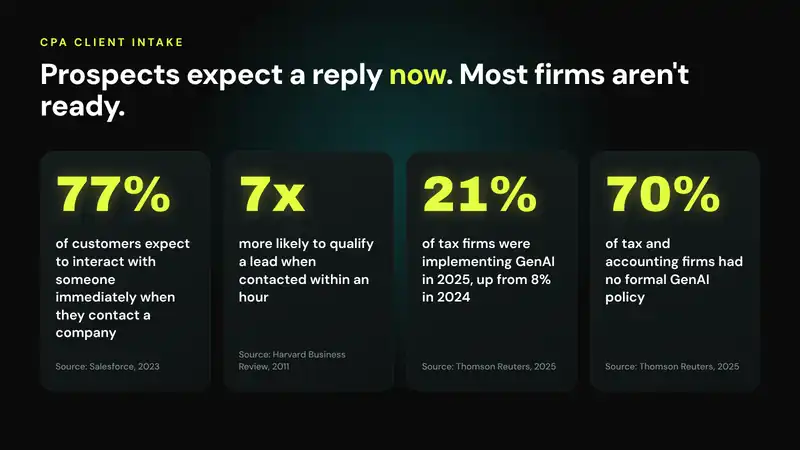
| 7x more likely to qualify a lead when contacted within an hour | A same-day reply is not fast enough. Intake needs to answer in minutes, including evenings and weekends. | Harvard Business Review, 2011 |
| 77% of customers expect to interact with someone immediately when they contact a company | Prospects treat your website form like a live channel. Silence reads as “too busy for me.” | Salesforce State of the Connected Customer, 2023 |
| 89% of customers say it is important to know whether they are talking to AI or a human | Your intake assistant should say clearly that it is an AI assistant and offer a person when asked. | Salesforce, 2023 |
| Tax firms implementing GenAI rose from 8% in 2024 to 21% in 2025 | Early adopters are pulling ahead. Most firms still have room to gain an edge. | Thomson Reuters Generative AI in Professional Services Report, 2025 |
| 70% of tax and accounting firms have no formal policy governing GenAI use | Rules on data, disclosure and review have to be part of any intake build, not something added later. | Thomson Reuters, 2025 |
| 34% of tax firms now deploy GenAI at an organizational level, up from 21% a year earlier | AI is moving from personal experiments to firm-wide workflows, and client intake is an obvious place to start. | Thomson Reuters AI in Professional Services Report, 2026 |
| Technology change and rising AI adoption ranked in the top two issues for five of six firm sizes | Your peers see AI as a top business issue, not a side project. | AICPA PCPS CPA Firm Top Issues Survey, 2026 |
Why Manual Intake Breaks Down in CPA Firms
Intake looks simple on paper: answer the inquiry, find out what they need, quote, collect documents, sign the engagement letter, book the kickoff. In practice, each step depends on someone remembering to do it, and that someone is usually also doing billable work.
Capacity is the real bottleneck
The 2026 AICPA PCPS Top Issues Survey of 629 participants found staff workload management in the top four concerns for the four largest firm-size groups, and staff retention in the top five for every size except sole practitioners. When the team is stretched, intake is the first thing to slip, because no client is waiting on it yet.
Where leads leak
- After-hours inquiries sit until the next business day, or until after a deadline week.
- Bad-fit prospects (wrong service, too small, outside your region) take the same partner time as ideal clients.
- Document chasing runs through email threads, with files sent as unsecured attachments.
- Engagement letters wait in someone’s drafts folder while the prospect cools off.
- No visibility: nobody can say how many inquiries came in last month or how many turned into clients.
Clients are also expecting more. Thomson Reuters reported in 2025 that 77% of corporate clients are looking to their tax firms to use GenAI. A slow, paper-heavy onboarding process is now part of how prospects judge your firm.
The Automated Client Intake System, Step by Step
The goal is not to replace your people. It is to make sure that every inquiry is answered, sorted and moved forward automatically, and that partners only spend time on qualified, prepared prospects. Here is the build we recommend.
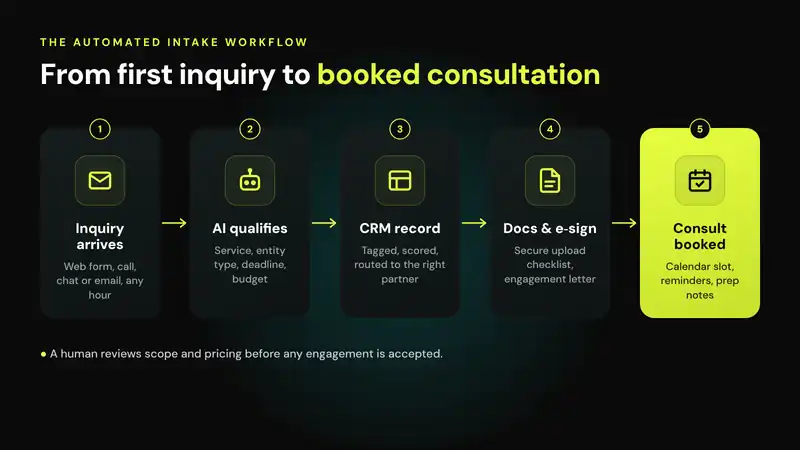
Step 1: Capture every inquiry in one place
Website forms, phone calls, live chat, Google Business Profile messages and email should all land in one CRM as a contact with a source tag. GoHighLevel is a common choice for small and mid-sized firms because it bundles CRM, forms, calendars, SMS, email and pipelines. Most 2026 pricing guides list its plans from about $97 per month, but confirm current pricing on GoHighLevel’s site before you commit. If your firm already lives in another CRM or practice management tool, n8n or webhooks can push inquiries there instead. See our guide on how to connect your CRM to other tools.
Step 2: Reply instantly with an AI intake assistant
An AI chatbot on your website, and an AI voice agent on your phone line, answer within seconds at any hour. They introduce themselves as the firm’s AI assistant, which matters because 89% of customers want to know when they are talking to AI (Salesforce, 2023). They then ask a short set of intake questions in plain English. If you are weighing the two approaches, our explainer on AI agents vs chatbots covers the difference.
Step 3: Qualify with the questions a partner would ask
- Which service do you need: individual tax, business tax, bookkeeping, payroll, advisory, IRS notice?
- Entity type and rough size (sole prop, LLC, S-corp, C-corp; revenue band or number of employees).
- Deadline or urgency (extension, notice response date, year-end).
- Current situation (switching firms, behind on filings, first-time business owner).
- Location and states involved, if multi-state work matters to you.
The answers become CRM fields and tags. A simple score routes the lead: ideal-fit prospects go straight to booking, borderline ones go to a staff member for review, and poor fits get a polite reply with a referral or resource. The assistant should never quote fees or give tax advice. It collects facts and hands them over.
Step 4: Book the consultation automatically
Qualified prospects pick a slot from the right person’s live calendar, with round-robin routing by service line if you need it. The CRM sends confirmation and reminders by email and SMS. It also sends the partner a one-page summary of the intake answers before the call, so nobody starts a consultation cold.
Step 5: Collect documents and signatures securely
Once a prospect is accepted, the workflow sends a checklist tailored to their service type, such as prior-year returns, entity documents, bank statements and payroll reports, with a link to your secure client portal rather than email attachments. Your engagement letter template is filled in from CRM data and sent for e-signature. The system then sends reminders until everything is in, and alerts staff only when something is missing after a set number of nudges.
Intake Workflows to Build First
You do not need to automate everything on day one. These workflows deliver the biggest gains for most firms:
| Workflow | Trigger | What Happens Automatically | Outcome |
|---|---|---|---|
| Instant reply | Form, chat or missed call | AI assistant responds in seconds and starts intake questions | No inquiry waits overnight |
| Qualification and routing | Intake answers saved | Lead scored, tagged by service, routed to booking, review or referral | Partners only see good-fit prospects |
| Consult booking | Lead marked qualified | Calendar link, confirmations, reminders, prep summary to partner | Fewer no-shows, better first calls |
| Document checklist | Prospect accepted | Service-specific checklist, portal link, reminder sequence | Less chasing, cleaner files |
| Engagement letter | Scope approved by staff | Letter generated from CRM data, sent for e-sign, status tracked | Faster signed engagements |
| Nurture for “not yet” | Prospect not ready | Seasonal check-ins before tax deadlines and year-end | Future clients stay warm |
Manual vs automated intake at a glance
- Response time: hours or days manually; seconds with an AI assistant.
- Qualification: partner phone screens; structured questions and scoring before anyone gets involved.
- Documents: email ping-pong; one checklist with automatic reminders.
- Reporting: guesswork; a pipeline that shows inquiries, bookings and signed clients by source.
If your team is new to building automations, our walkthrough of AI workflows for non-technical teams is a good primer. Firms that want this done for them can see our AI automation services.
Keep Humans in the Loop and Protect Client Data
Accounting is a trust business, and your intake system should reflect that. Salesforce found that 80% of customers say it is important for humans to validate AI’s outputs. In practice that means:
- A staff member approves scope and pricing before any engagement letter goes out.
- The AI assistant collects information but does not give tax or accounting advice.
- Sensitive documents and identifiers go through your secure portal, never through chat or SMS.
- A written AI-use policy covers disclosure, data retention and who reviews what. Given that 70% of firms have no formal GenAI policy (Thomson Reuters via CPA Practice Advisor, 2025), writing one puts you ahead.
Measure results from the start. Thomson Reuters’ 2026 report notes that only 19% of tax firms using AI actually measure its ROI. Track response time, inquiry-to-consult rate, consult-to-signed rate and hours saved per month, so you know what the system is worth.
Common Mistakes to Avoid
- Automating a broken process. Map your current intake steps and remove the unnecessary ones before you build.
- Hiding the AI. Pretending the assistant is a person damages trust as soon as clients notice.
- Asking too much up front. Keep the first conversation to five or six questions, and collect the rest after booking.
- No escape hatch. Prospects must always be able to reach a human or leave a callback request.
- Sending documents over chat or email. Route every sensitive file through a secure portal.
- Set-and-forget. Review transcripts and pipeline data monthly, especially before tax season, and update questions and routing rules.
Frequently Asked Questions
Will an AI intake assistant feel impersonal to clients?
Not if it is set up well. Prospects mostly want a fast, clear answer; 77% expect to interact with someone immediately when they contact a company (Salesforce, 2023). A friendly assistant that replies at 9 p.m. and books a call with a named partner feels more personal than an inbox that stays silent until tomorrow.
Does this work with our existing practice management software?
Usually, yes. Intake can run in GoHighLevel and pass accepted clients into your practice management or document system through native integrations, APIs, webhooks or n8n. The right setup depends on your current stack, which is why we start every project with a short systems audit.
Is it safe to use AI with client information?
It can be, with the right design. Limit what the AI collects to intake basics, keep sensitive files in a secure portal, choose vendors whose data terms you have reviewed, and document it all in a firm AI policy. Speak with your compliance adviser about any rules specific to your jurisdiction.
How long does it take to set up?
A focused first version covering instant reply, qualification, booking and reminders can typically go live in a few weeks. Document checklists, engagement letters and nurture sequences can be added in later phases, ideally before your busiest season.
Conclusion
Your next best client is probably already filling in a form on your website. Whether they become a client depends on what happens in the next hour. An automated intake system answers instantly, asks the right questions, books the consultation, collects documents and keeps your team in control of every decision. Thomson Reuters’ 2026 report found that only 14% of tax firms use agentic AI in their workflows today, while 80% expect it to be central within five years. Firms that build their intake system now will have the advantage.
Cubikey builds this system for accounting and CPA firms, from the AI assistant and GoHighLevel workflows to the integrations with your existing tools. Talk to Cubikey about automating your client intake. For background on the technology, read what AI agents are and why businesses need them now.
Sources
- Harvard Business Review, “The Short Life of Online Sales Leads” (2011)
- Salesforce, State of the Connected Customer, 6th edition (2023)
- CPA Practice Advisor, reporting the Thomson Reuters 2025 Generative AI in Professional Services Report (2025)
- Thomson Reuters, “The real AI story in tax and audit isn’t adoption, it’s impact” (2026)
- Journal of Accountancy, AICPA PCPS CPA Firm Top Issues Survey (2026)
- GoHighLevel pricing information (accessed 2026)