

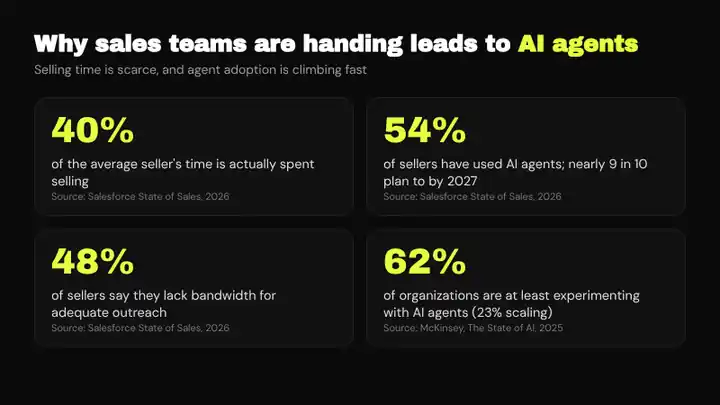
Your best lead of the week probably came in at 9:47 pm. They filled in a form, asked a quick question, and then waited. By the time someone on your team called back the next morning, they had already booked with a competitor who replied first. It is not a people problem. According to the Salesforce State of Sales report (2026), the average seller spends just 40% of their time actually selling. The rest goes on admin, data entry and chasing.
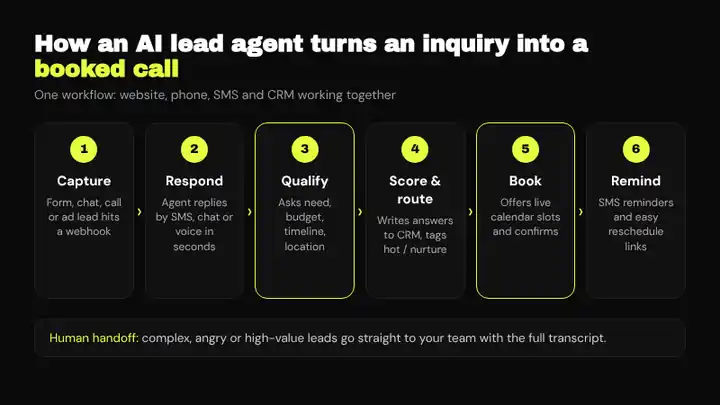
An AI agent that qualifies leads and books appointments fixes this gap. It replies in seconds, asks the right questions, writes the answers into your CRM, and puts a confirmed meeting on your calendar, at any hour. This guide shows exactly how to build one: the components, the qualification logic, the booking flow, the tools, and the mistakes that sink most projects.
AI Lead Qualification Agents: The Numbers That Matter
| Statistic | What It Means for Your Sales Team | Source + Year |
|---|---|---|
| The average seller spends 40% of their time selling | Six in ten working hours are lost to tasks an agent can absorb, like first replies and data entry | Salesforce State of Sales, 2026 |
| 54% of sellers say they’ve used AI agents; nearly 9 in 10 plan to by 2027 | Agent-led qualification is becoming normal; waiting means competing against faster teams | Salesforce State of Sales, 2026 |
| 48% of sellers say they lack bandwidth for adequate outreach | Leads go cold because nobody has time to follow up, not because they were bad leads | Salesforce State of Sales, 2026 |
| 87% of sales organizations use some form of AI (prospecting, forecasting, lead scoring, emails) | The tooling is mature; the edge now comes from how well it is wired into your process | Salesforce State of Sales, 2026 |
| Top-performing sellers are 1.7x more likely to use prospecting AI agents than underperformers | Agents are a habit of winning teams, not just a cost-saving experiment | Salesforce State of Sales, 2026 |
| 62% of organizations are at least experimenting with AI agents; 23% are scaling one | Most businesses are still testing, so a working agent is still a real advantage | McKinsey, The State of AI, 2025 |
| Gartner predicts over 40% of agentic AI projects will be canceled by end of 2027 | Scope, cost control and clear value matter; build for one job first | Gartner, 2025 |
| Behaviourally designed SMS reminders cut missed appointments by 33.7% | Booking is only half the job; automated reminders protect the meetings your agent books | NSW Behavioural Insights Unit, 2021 (2019 trial) |
Why Manual Qualification and Booking Break Down
Back in 2011, research published in Harvard Business Review (“The Short Life of Online Sales Leads”) concluded that most companies are not responding to online leads nearly fast enough. Fifteen years later, the pattern is the same, just with more channels: web forms, live chat, Facebook lead ads, Google Business messages, missed calls and texts.
A typical manual process looks like this:
- Slow first reply: leads that arrive after hours or during busy periods wait hours or days.
- Inconsistent questions: each rep qualifies differently, so the CRM fills with half-complete records.
- Calendar ping-pong: “Does Tuesday work?” emails add another day or two before a meeting exists.
- No-shows: meetings get booked but nobody reminds the prospect.
- Time drain: your best closers spend their day on tire-kickers instead of ready buyers.
The Salesforce data explains why: sellers devote nearly a full day of their workweek to prospecting, yet 48% still say they lack the bandwidth for proper outreach. More hustle will not fix this. A system that handles the first conversation automatically will.
What an AI Lead Qualification and Booking Agent Actually Does
A chatbot answers questions. An agent completes a job. (If the difference is fuzzy, our explainer on AI agents vs chatbots covers it.) A lead qualification agent has one clear job: turn a new inquiry into either a booked appointment, a nurture sequence, or a polite “not a fit”, and log everything in your CRM along the way.
To do that, it needs four building blocks:
- Channels: where it talks to leads, such as website chat, SMS, WhatsApp, email and an AI voice agent for inbound and missed calls.
- Brain: a large language model with a tight prompt, your FAQs, service areas, pricing rules and qualification criteria.
- Tools: actions it is allowed to take, like create or update a CRM contact, check calendar availability, book a slot, tag a lead, or alert a human.
- Memory and logging: every answer and transcript saved to the contact record so your team never re-asks the same questions.
How to Build the Agent, Step by Step
Step 1: Define what “qualified” means for you
Most agents fail here, not in the technology. Write down 4–6 questions your best rep asks before agreeing to a meeting. A simple framework that works for most service businesses:
- Need: what problem or service are they asking about?
- Fit: are they in your service area, industry or size range?
- Timeline: this week, this month, or “just researching”?
- Budget or scope: a range, not an exact figure.
- Decision maker: are they the person who signs off?
Then turn the answers into a simple score: for example, hot (book now), warm (nurture plus offer a call), cold (send resources) and disqualified (polite close). For an industry-specific example, see how we map this for AI lead qualification for HVAC companies.
Step 2: Connect every lead source to one entry point
Every form, ad platform and chat widget should push leads into the same place, usually your CRM or a webhook that triggers your automation. In GoHighLevel this is a workflow trigger such as “Form Submitted” or “Customer Replied”. With n8n, a Webhook node receives the payload from any source and passes it on. One entry point means one set of rules, and no lead slips through a forgotten inbox.
Step 3: Write the agent’s instructions and guardrails
Your prompt is the agent’s job description. Include who it represents, the tone to use, the questions to ask (one at a time), what it must never do (quote final prices, give legal or medical advice, promise availability it has not checked), and when to hand over to a human. Feed it a short knowledge base: services, service areas, hours, common objections and approved answers.
Step 4: Give it live calendar access
Qualification without booking just creates another to-do. Connect the agent to a real calendar (GoHighLevel calendars, Google Calendar, Calendly or Cal.com via API) so it can offer two or three actual open slots, confirm the choice, and create the event with the lead’s details attached. Round-robin calendars let it spread meetings across your team automatically.
Step 5: Write results back to the CRM and route
Each answer should land in a custom field, the score should set a tag or pipeline stage, and the full transcript should be attached as a note. Hot leads trigger an instant SMS or Slack alert to the assigned rep. Warm leads drop into a nurture sequence, the kind of multi-touch follow-up we break down in our real estate lead follow-up with AI and GoHighLevel guide.
Step 6: Protect the booking with reminders
Send a confirmation immediately, a reminder the day before and another an hour before, each with a one-tap reschedule link. This is not a small detail. A 2019 trial by the NSW Behavioural Insights Unit found that well-worded SMS reminders reduced missed appointments by 33.7%. That was in hospitals, but the lesson carries over to sales calls and site visits.
The Workflows Behind a Working Agent
Here is how the pieces map to triggers, actions and outcomes in a typical build:
| Trigger | Agent Action | Outcome |
|---|---|---|
| Web form or lead ad submitted | Instant SMS or email opening a qualifying conversation | Lead engaged within seconds, not hours |
| Inbound or missed call | AI voice agent answers, asks questions, offers slots | No call goes to voicemail and disappears |
| Website chat started | Chat agent answers FAQs, then qualifies | Visitors become booked calls, not bounces |
| Lead scored “hot” | Book on live calendar, alert assigned rep | Rep walks into the call with full context |
| Lead scored “warm” | Add to nurture workflow, offer a call later | Future pipeline instead of a dead lead |
| Appointment booked | Confirmation plus reminders plus reschedule link | Fewer no-shows |
| Complex, angry or high-value lead | Hand off to a human with transcript | Agent never fumbles a sensitive conversation |
Choosing your stack
- All-in-one (GoHighLevel): CRM, calendars, SMS, workflows and built-in conversation AI in one platform. Fastest path for local and service businesses.
- Flexible (n8n + LLM + your CRM): best when you already use HubSpot, Salesforce, Zoho or a custom system and want full control over logic and data.
- Voice layer: an AI voice agent connected by webhook or API for calls, which is essential for businesses where buyers still pick up the phone.
Platform features and plan prices change often, so confirm current details on each vendor’s pricing page before you commit. If you want the full picture of what can be automated around this agent, our AI automation services page shows how we connect these systems.
Common Mistakes to Avoid
- Building a “do everything” agent. Gartner expects over 40% of agentic AI projects to be canceled by the end of 2027. Start with one job (qualify and book) and prove the ROI.
- Asking ten questions at once. Long interrogations kill conversations. Ask one question at a time and stop when you have enough to decide.
- No human escape hatch. Always give leads a way to reach a person, and route edge cases automatically.
- Booking into a fake calendar. If the agent cannot see real availability, you will double-book and lose trust fast.
- Not logging data. An agent that books meetings but leaves the CRM empty creates more work, not less.
- Ignoring consent rules. Get proper opt-in for SMS and calls, and follow local rules such as TCPA in the US.
- Set and forget. Review transcripts weekly for the first month and tighten the prompt where leads drop off.
Frequently Asked Questions
Will an AI agent replace my sales team?
No. It replaces the repetitive first steps: replying, asking basic questions, scheduling and reminding. Your team spends more time on the calls that close. Salesforce reports that sellers expect agents to cut prospect research time by 34% and email drafting by 36% once fully implemented.
How long does it take to build?
A focused qualify-and-book agent on one or two channels can usually go live in a few weeks, including testing. Adding voice, multiple calendars or custom CRM integrations extends the timeline.
Do leads mind talking to AI?
Most leads care about getting a fast, useful answer and an easy way to book. Be transparent that they are chatting with an assistant, keep the tone natural, and offer a human whenever they ask.
Which industries benefit most?
Any business where speed and appointments drive revenue: home services, real estate, law firms, accounting practices, clinics, agencies and B2B services. If a booked call or site visit is the step before a sale, an agent helps.
Conclusion
Leads do not wait, and your team cannot be online 24/7. An AI agent that qualifies leads and books appointments closes that gap. It responds instantly, asks consistent questions, fills your calendar with the right people, and keeps your CRM clean. Start with one clear job, connect it to your real calendar and CRM, protect bookings with reminders, and improve it every week.
Cubikey builds this system for service businesses, from the qualification logic and AI chat and voice agents to GoHighLevel or n8n workflows and CRM integrations. Want an agent that turns every inquiry into a booked call? Talk to Cubikey.
Sources
- Salesforce – State of Sales report announcement (February 2026; survey of 4,050 sales professionals)
- McKinsey – The State of AI in 2025: Agents, innovation, and transformation (November 2025)
- Gartner – Over 40% of Agentic AI Projects Will Be Canceled by End of 2027 (June 2025)
- NSW Behavioural Insights Unit – Using reminders to cut missed hospital appointments (2021)
- Oldroyd, McElheran & Elkington – The Short Life of Online Sales Leads, Harvard Business Review (2011)