

A plumbing company runs a Google ad on Thursday evening. Eleven people fill in the quote form before Friday lunch. The office manager calls four of them back on Monday, and by then three have already booked someone else. Nobody on that team is lazy. The follow-up simply depended on one person remembering to do it.
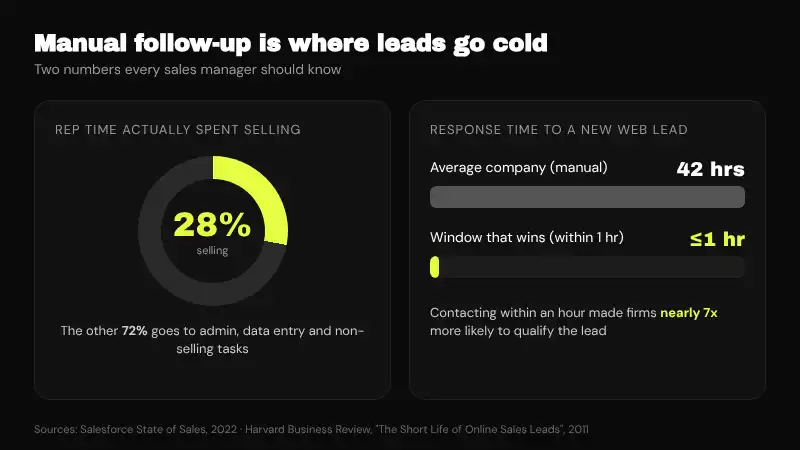
That gap is common. A Harvard Business Review audit of 2,241 US companies found the average reply to a web lead took 42 hours, and firms that made contact within an hour were nearly seven times more likely to qualify the lead. AI CRM automation closes that gap: your CRM, an AI assistant and a set of rules reply to each lead within a minute, ask the qualifying questions and keep following up until the person books or says no.
Lead follow-up by the numbers
| Statistic | What it means for your sales team | Source + year |
|---|---|---|
| Firms contacting a lead within an hour were nearly 7x more likely to qualify it | Reply speed is the cheapest conversion fix you have | Harvard Business Review, 2011 |
| Average response time to a web lead: 42 hours | Most competitors are slow, so a fast reply stands out | Harvard Business Review, 2011 |
| Sales reps spend 28% of their week selling | Admin and chasing replies take most of the week | Salesforce State of Sales, 2022 |
| 66% of reps feel overwhelmed by their tools | Automation has to remove tabs, not add one | Salesforce State of Sales, 2022 |
| Median first call response: 3 hours 8 minutes; 47% of companies never responded | Even decent teams miss the first hour or drop leads entirely | HubSpot, citing InsideSales research |
| Nearly nine in ten respondents use AI regularly in at least one business function | AI use is normal now; results depend on where you apply it | McKinsey State of AI, 2026 |
| 40% of large organizations scale AI agents vs 22% of smaller ones | Smaller firms are behind, and can catch up quickly | McKinsey State of AI, 2026 |
| By 2028 AI agents will outnumber sellers 10 to 1; fewer than 40% of sellers will say agents improved productivity | Adding agents is easy. Designing them well is the hard part. | Gartner, 2026 |
Why manual lead follow-up breaks down
Manual follow-up asks a busy person to repeat a small task at the right moment, dozens of times a day. Software handles that better than people do.
Reps don’t have the hours
Salesforce’s State of Sales report found reps spend 28% of their week actually selling. The rest goes on data entry, internal admin and chasing people who haven’t replied. Each form copied into the CRM by hand, and each fourth “just checking in” email, comes out of selling time.
Policies slip on busy days
Most teams have a follow-up rule. Few keep it on Friday afternoons, during holidays or in a busy month. What usually happens:
- After-hours leads wait until the next morning, sometimes the next week.
- Prospects get one or two touches, then drop off the list.
- Call notes stay on phones and in inboxes, so nobody sees the full history.
- “Not ready yet” leads are never contacted again, though some buy a few months later.
HubSpot, reporting InsideSales research, found a median first call response of three hours and eight minutes. Of the companies studied, 47% never responded at all. That is a process problem, and a process can be automated.
What AI CRM automation does that basic rules can’t
Standard CRM automation is “if this, then that”: a form comes in, email A goes out. It works until a lead replies with a question the template didn’t expect. An AI layer can read that reply, answer it and decide what to do next. A working setup has four parts:
- The CRM (GoHighLevel, HubSpot, Salesforce, Zoho or similar), which holds every contact, conversation and deal stage.
- An AI chat or SMS assistant that replies in plain language, answers common questions and asks qualifying ones.
- An AI voice agent that answers or returns calls, takes details and books into your calendar.
- Integrations (native workflows, webhooks, APIs or n8n) that push forms, ad leads, call tracking and calendar events into the CRM.
For the qualification and booking side in detail, see our guide on building an AI agent that qualifies leads and books appointments.
How to set up automated lead follow-up in five steps
1. Send every lead source into one CRM
You can’t follow up on leads you can’t see. Connect website forms, chat, Facebook and Google lead forms, phone calls, directory listings and email inquiries so each one creates or updates a contact with its source tagged. Where a platform has no native connector, a webhook or an n8n workflow usually fills the gap. Our article on connecting your CRM to other tools lists the usual options.
2. Reply within a minute
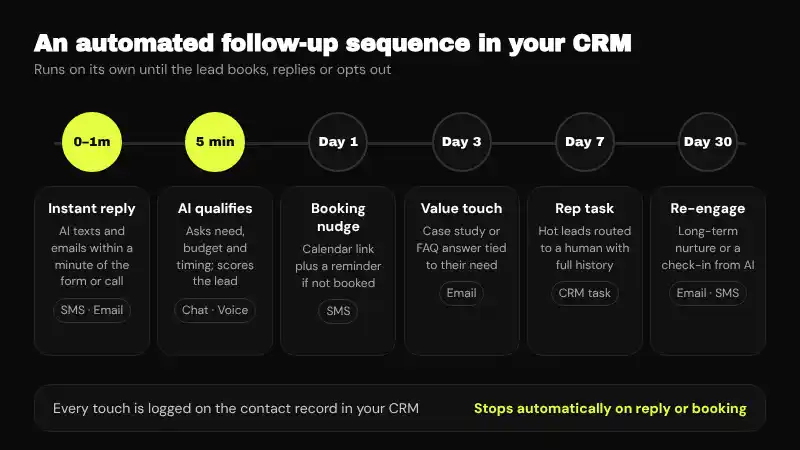
The first message goes out by SMS and email the moment the lead arrives, signed by a named person on your team. It confirms what they asked for, says what happens next and invites a reply. Given the Harvard Business Review finding on the first hour, this one workflow often moves results more than anything else you build.
3. Let AI ask the qualifying questions
Instead of a rep phoning to ask the same five questions, the AI asks them by text, chat or voice: what they need, by when, budget range, location and who else decides. Answers go into CRM fields and a lead score sets the next step. Hot leads go to a person straight away. Early-stage leads move into a nurture sequence.
4. Build a sequence that stops itself
Most deals need several touches. Mix SMS, email and calls, give the lead something useful each time, and set the sequence to stop the moment they reply, book or opt out. An automated “still interested?” text sent after someone has booked does real damage to trust.
5. Bring in a person at the right moment
Automation should take away busywork, not the relationship. Have the CRM create a task for a rep when a lead scores hot, when the AI isn’t sure of an answer, or when a large prospect goes quiet. The rep then opens the conversation with the full transcript in front of them.
Which follow-up workflows to automate first
You don’t need fifty automations on day one. These six cover most manual follow-up work for service businesses, agencies and B2B teams.
| Workflow | Trigger | What runs automatically | Result |
|---|---|---|---|
| Speed-to-lead | New form, chat or ad lead | SMS and email reply, contact created and tagged | Every lead answered in under a minute |
| Missed call text-back | Unanswered inbound call | Text sent within seconds; AI voice or chat picks up the conversation | Callers don’t move on to a competitor |
| AI qualification | Lead replies | AI asks need, timing and budget, then scores the lead | Reps talk only to qualified buyers |
| Booking and reminders | Qualified lead | Calendar link, confirmation, 24-hour and 1-hour reminders | More booked calls, fewer no-shows |
| Quote follow-up | Proposal sent, no reply in 48 hours | Personal nudges, answers to common questions, rep task on day 7 | Fewer deals lost to silence |
| Database reactivation | No activity for 90+ days | AI-written check-in by SMS and email | Sales from leads you already paid for |
The details change by industry. Our posts on AI lead follow-up for HVAC companies and real estate lead follow-up with GoHighLevel show the same building blocks applied to home services and property sales.
GoHighLevel, n8n or your current CRM?
Pick the stack your team will open every day. Prices for CRM, SMS and AI usage change often, so check current plans before you commit.
- GoHighLevel puts the CRM, pipelines, two-way SMS and email, calendars and workflows in one account. It suits small and mid-sized service businesses that want fewer moving parts.
- If your team already works in HubSpot, Salesforce or Zoho, you rarely need to switch. Add AI through native features, APIs and webhooks.
- n8n connects systems that don’t talk to each other and can call AI models inside a workflow. It runs in the cloud or on your own server.
Where AI follow-up projects go wrong
Gartner predicts AI agents will outnumber sellers ten to one by 2028, yet fewer than 40% of sellers will say those agents improved productivity. In our projects, the shortfall usually traces back to one of these:
- Automating a messy pipeline. If stages and lead definitions are vague, AI just moves the confusion faster. Define stages first.
- Duplicate and half-empty contacts. They break personal messages and routing. Clean the data before launch.
- Template-sounding messages. Keep texts short and let the AI reuse the lead’s own words.
- No stop rules, so sequences keep firing after a reply or a booking.
- Ignoring consent law. SMS and calls are regulated (TCPA in the US, CASL in Canada). Record consent and process opt-outs automatically.
- Never reviewing it. Read a sample of conversations each week and track reply time, booking rate and show rate.
Frequently asked questions
What is AI CRM automation?
AI CRM automation is AI working inside your CRM workflows. It replies to new leads, asks qualifying questions, updates contact records, books appointments and runs follow-up sequences on its own. Your team steps in for high-value or complicated conversations, with the full history already logged in the CRM.
Will AI replace my sales team?
No. It replaces the repetitive part of their day. Salesforce found reps spend only 28% of their week selling, so the gain is time handed back for real sales conversations. People still handle negotiation, objections and relationships, which is where most deals are won or lost.
Do I have to change my CRM to add AI follow-up?
Usually not. Most current CRMs support APIs and webhooks, so AI chat, voice and workflow tools connect to the system you already use. Switching only makes sense if your CRM can’t do two-way SMS or automation at all, or if your team has stopped using it.
How long does it take to go live?
A first version with speed-to-lead replies, AI qualification and booking is often live within a few weeks. The timeline depends mostly on how many lead sources and integrations you have. Reactivation campaigns and reporting dashboards can be added once the core flow is stable.
Where to start
Pull last month’s leads from your CRM and check two numbers: how long each one waited for a first reply, and how many never got a second touch. If the answers are “hours” and “most of them”, start with the speed-to-lead and stop-on-reply sequence above. They are the fastest to build and the easiest to measure.
Cubikey builds this system for growing businesses, from CRM and GoHighLevel setup to AI chat, voice agents and n8n integrations. See our AI automation services, or Talk to Cubikey about your follow-up.
Sources
- Harvard Business Review: The Short Life of Online Sales Leads (Oldroyd, McElheran, Elkington), 2011
- Salesforce: State of Sales (5th edition), December 2022
- HubSpot: Average Lead Response Time (citing InsideSales research)
- McKinsey: The State of AI in 2026: On the Road to ROI
- Gartner: AI Agents Will Outnumber Sellers 10 to 1 by 2028, July 2026