
Sales reps spend just 28% of their week actually selling, according to Salesforce’s State of Sales research. The rest disappears into data entry, copying leads between tools, chasing updates and switching between an average of 10 different apps. That is not a people problem. It is a plumbing problem: your forms, inbox, phone system, calendar and CRM do not talk to each other, so humans become the glue.
This guide shows how to fix that plumbing with three building blocks: n8n (the workflow engine that connects your apps), AI (the part that reads, decides and writes) and your CRM (the single source of truth). Put together, they form intelligent business automation: systems that do not just move data from A to B, but understand what came in and take the right next step.
n8n + AI + CRM Automation: The Numbers That Matter
| Statistic | What It Means for Your Business | Source + Year |
|---|---|---|
| 88% of organizations use AI regularly in at least one business function (up from 78% a year earlier) | AI is now mainstream. The edge comes from connecting it to real workflows, not from having it. | McKinsey, The State of AI, 2025 |
| 62% are at least experimenting with AI agents; 23% are already scaling an agentic AI system | Competitors are moving from chat experiments to agents that act inside business systems. | McKinsey, The State of AI, 2025 |
| Only 39% report any EBIT impact from AI | Most AI spend is not yet paying off, usually because it sits outside core processes like the CRM. | McKinsey, The State of AI, 2025 |
| Reps spend 28% of their week actually selling | Manual admin is eating most of your sales capacity. Automation gives that time back. | Salesforce, State of Sales, 2022 |
| Sales teams use an average of 10 tools to close deals; 66% of reps feel overwhelmed by them | Tool sprawl is real. An integration layer like n8n makes those tools behave like one system. | Salesforce, State of Sales, 2022 |
| 40% of enterprise apps will feature task-specific AI agents by end of 2026, up from less than 5% in 2025 | Your software stack is about to get agents built in. You need a way to orchestrate them. | Gartner, 2025 |
The pattern is clear. According to McKinsey’s 2025 State of AI survey, almost everyone is using AI, but far fewer are getting bottom-line value from it. The gap is integration. AI that lives in a browser tab cannot update a deal, book an appointment or alert a manager. AI wired into n8n and your CRM can.
What Each Piece Does (and Why You Need All Three)
n8n: the connector and the conductor
n8n is a workflow automation platform. It listens for events (a webhook from your website form, a new email, a missed call, a Shopify order), then runs a sequence of steps across your other apps. Unlike many tools, it can be self-hosted. n8n says a standard self-hosted Community Edition is available on GitHub, and its cloud plans are priced by workflow executions, with unlimited users and workflows on every plan. According to n8n’s pricing page at the time of writing, Starter is listed at €20/month (billed annually) for 2,500 executions and Pro at €50/month for 10,000. Prices change, so confirm on n8n’s site before you budget.
AI: the decision-maker
Traditional automation follows fixed rules: “if form field = X, do Y.” That breaks the moment a customer writes something unexpected. An AI step (an LLM such as OpenAI’s or Anthropic’s models, called from n8n) can read free text, classify intent, extract details like budget or service type, summarize a call transcript and draft a reply. n8n includes AI agent and LLM nodes, so these steps sit inside the same workflow as everything else.
CRM: the memory
Whether you use GoHighLevel, HubSpot, Salesforce, Pipedrive or Zoho, the CRM is where contacts, deals, tasks and history live. Without it, AI decisions vanish after each run. With it, every action is logged, every lead has an owner and your dashboards reflect reality. If you are still deciding how your CRM should plug into everything else, our guide on how to connect your CRM to other tools covers the options.
How an Intelligent Workflow Actually Runs
Here is the core pattern Cubikey uses for most n8n + AI + CRM builds. It works for a roofing estimate request, a law firm inquiry, an ecommerce support ticket or a B2B demo request.
- Trigger: a form submission, inbound call, chat message or email hits an n8n webhook or polling node.
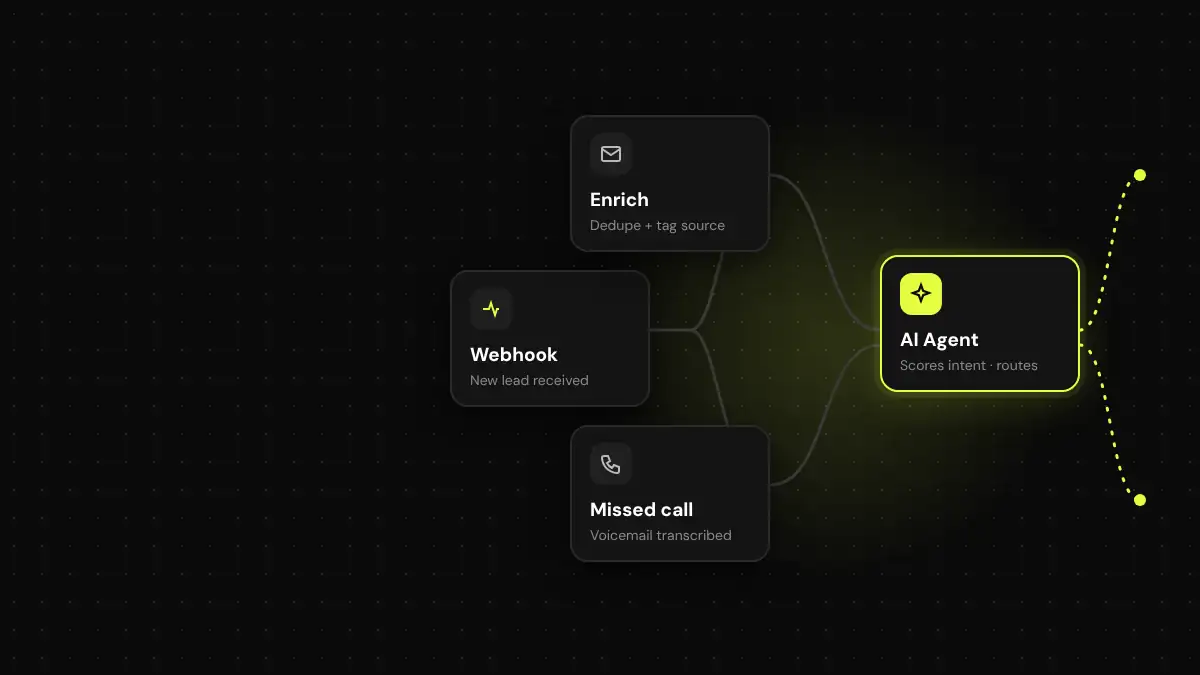
- Enrich and clean: n8n normalizes phone numbers and emails, checks the CRM for an existing contact and tags the lead source.
- AI decides: an LLM node scores intent, picks a category (new lead, existing customer, support, spam) and drafts a personalized reply.
- CRM update: the contact, deal and pipeline stage are created or updated, with the AI summary saved as a note.
- Act: send an SMS or email, offer booking links, assign the right rep and alert them in Slack or Teams.
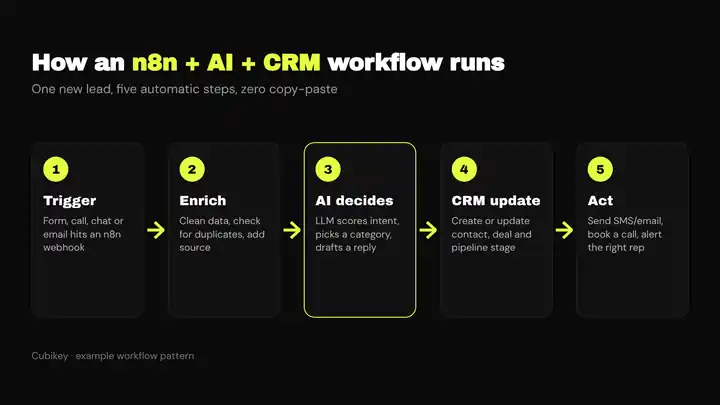
The magic is in step 3. A rules-only system would send every lead the same template. An AI step can tell the difference between “my AC died and I have a newborn at home” and “just collecting quotes for next spring,” and route each one accordingly.
Step-by-Step: Building Your First n8n + AI + CRM System
Step 1: Map one painful process end to end
Do not start with “automate everything.” Pick one process that costs you money every week: new lead follow-up, quote chasing, support triage or client onboarding. Write down every step a person does today, which tools they touch and where things get dropped.
Step 2: Decide where n8n runs
- n8n Cloud: fastest to start, managed updates, priced by executions.
- Self-hosted: full data control and no per-execution fees on the Community Edition, but you own hosting, backups and security.
- Hybrid: sensitive workflows (legal, finance, health) self-hosted; marketing workflows on cloud.
Step 3: Connect the CRM properly
Use the CRM’s official API or n8n’s native node where one exists. For GoHighLevel, that usually means a private integration token plus inbound webhooks from GHL workflows back into n8n, so the two systems can trigger each other. Define your field mapping once (lead source, service, urgency, AI score, AI summary) and reuse it across every workflow.
Step 4: Write the AI step like a job description
The prompt is where most projects succeed or fail. Give the model a role, your business rules, the exact categories allowed and a strict JSON output format. Then validate the output in n8n before anything touches the CRM. If the JSON is malformed or the confidence is low, route it to a human review queue instead of guessing.
Step 5: Add actions, then guardrails
- Rate-limit outbound SMS and email so a bug cannot spam your list.
- Log every run (input, AI output, action taken) to a sheet or database.
- Set error workflows in n8n that alert you when an API fails.
- Keep a human approval step for anything legal, financial or irreversible.
Step 6: Measure and expand
Track response time, booked appointments, hours saved and error rate for 30 days. Once the first workflow is stable, clone the pattern for the next process. Most businesses end up with a small library of workflows that share the same CRM mapping and AI prompts.
Workflows Worth Building First
| Workflow | Trigger | What AI Does | CRM Outcome |
|---|---|---|---|
| Instant lead response | Website form or ad lead | Scores intent, drafts a personal SMS/email | Contact + deal created, rep assigned, booking link sent |
| Missed-call recovery | Missed call from phone system | Summarizes voicemail, picks the best reply | Text-back sent, task created for callback |
| Email inbox triage | New email to shared inbox | Classifies (sales, support, billing, spam) | Routed to correct pipeline or ticket |
| Call notes to CRM | Call recording finished | Transcribes, summarizes, extracts next steps | Note saved, stage updated, follow-up scheduled |
| Old lead reactivation | Weekly schedule | Writes tailored check-in messages | Re-engaged leads moved back into active stage |
| Weekly pipeline digest | Monday 8am schedule | Summarizes deals at risk and wins | Report sent to owner, stale deals flagged |
If lead follow-up is your biggest leak, start there. We break down the full follow-up sequence in AI CRM Automation: How Businesses Can Eliminate Manual Lead Follow-Up, and the qualification and booking side in How to Build an AI Agent That Qualifies Leads and Books Appointments.
The Business Case: Why Now
The tools are ready and the market is moving. Gartner predicts 40% of enterprise applications will be integrated with task-specific AI agents by the end of 2026, up from less than 5% in 2025. That means your CRM, helpdesk and phone system will each ship their own agents. Without an orchestration layer, you will have a dozen smart tools that still do not share context. n8n is that layer.
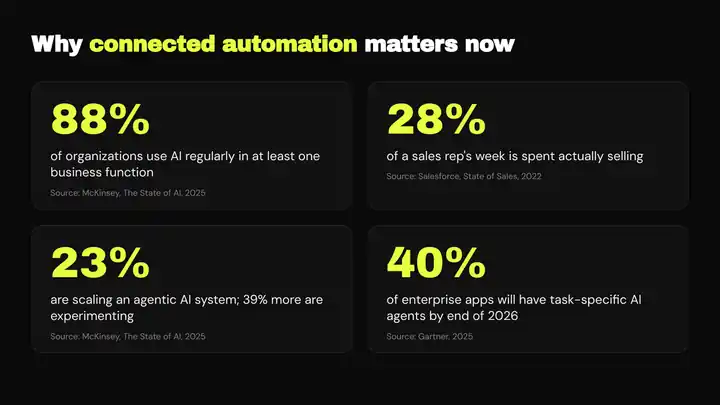
Meanwhile, the cost of doing nothing is visible on your team’s calendar. If reps sell for only 28% of the week, even reclaiming a few hours of admin per person per week adds real selling capacity without a new hire.
Common Mistakes to Avoid
- Automating a broken process. If your pipeline stages are unclear, AI will just make the mess faster. Fix the process first.
- Letting AI write straight to the CRM without validation. Always check structure and confidence before updating records.
- One giant workflow. Break systems into small, reusable sub-workflows. They are easier to debug and reuse.
- Ignoring duplicates. Search before you create, or your CRM fills with three copies of every lead.
- No monitoring. APIs change and tokens expire. Error workflows and alerts are not optional.
- Skipping compliance. Respect SMS consent rules (such as TCPA in the US), opt-outs and data privacy laws in every market you serve.
Frequently Asked Questions
Is n8n better than Zapier or Make for AI + CRM automation?
It depends on your needs. n8n stands out when you want self-hosting, complex branching, custom code steps or execution-based pricing that does not charge per step. Zapier is simpler for very basic automations. For multi-step AI workflows tied to a CRM, n8n is often the more flexible and cost-predictable choice.
Do I need to replace my CRM to use this?
No. n8n connects to most popular CRMs through native nodes or their APIs. The point is to make your existing CRM smarter, not to migrate.
Is AI automation actually delivering results for businesses?
For some. McKinsey’s 2025 survey found 88% of organizations use AI, but only 39% report any EBIT impact. The companies seeing returns tend to embed AI into core workflows, which is exactly what an n8n + CRM setup does.
How long does a first build take?
A single focused workflow, such as instant lead response, can typically be designed, built and tested in one to three weeks, depending on how clean your CRM data is and how many systems are involved.
Conclusion
Intelligent business automation is not one tool. It is n8n moving data between your apps, AI making judgment calls on that data, and your CRM remembering everything. Start with one leaky process, build it with guardrails, measure it and then expand. The businesses that do this now will spend their time selling and serving customers while their competitors are still copying and pasting.
Cubikey designs and builds n8n + AI + CRM systems for service businesses and ecommerce brands across the US, Canada, Australia and India, from webhook integrations and GoHighLevel workflows to AI agents that qualify and route leads. See our AI automation services, or Talk to Cubikey about building this system for your business.
Sources
- McKinsey & Company, “The state of AI in 2025: Agents, innovation, and transformation” (2025)
- Salesforce, State of Sales research: “Sales Reps Spend Less than 30% of Their Time Actually Selling” (2022)
- Gartner, “Gartner Predicts 40% of Enterprise Apps Will Feature Task-Specific AI Agents by 2026” (2025)
- n8n, Pricing page (accessed November 2026)
- n8n Blog, “n8n’s new pricing explained” (2025)